# App & Zugang

### WebUntis Web-URL

[https://cissa.webuntis.com/WebUntis/?school=Georg-herwegh-gym](https://cissa.webuntis.com/WebUntis/?school=Georg-herwegh-gym)

<details id="bkmrk-anmelden-im-web-...-"><summary>Anmelden im Web ...</summary>

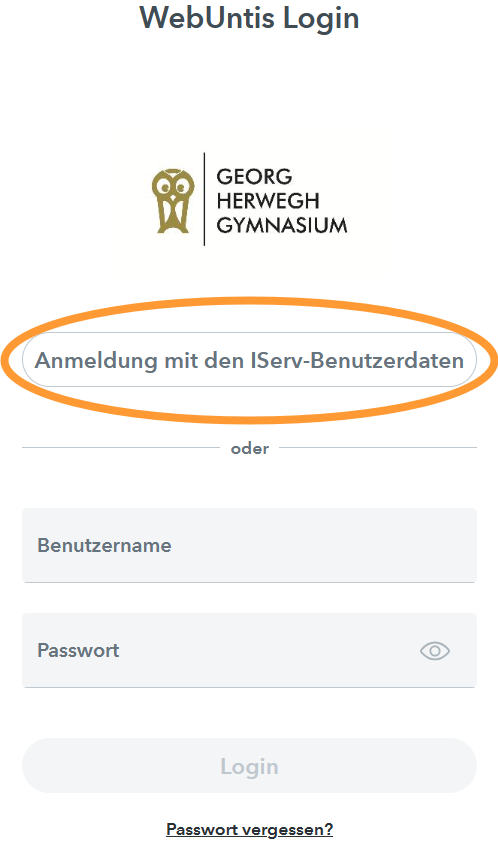
Klick auf "Anmeldung mit den IServ-Benutzerdaten"  
Benutzer: BENUTZERNAME.ISERV@ghg.berlin  
Passwort. ISERV-PASSWORT

<div drawio-diagram="45"><img src="https://ghg.berlin/doc/uploads/images/drawio/2023-11/drawing-3-1700906589.png" alt=""/></div>

</details>### Untis Mobile Apps für Mobilgeräte

iOS: [Untis Mobile im App Store (apple.com)](https://apps.apple.com/at/app/untis-mobile/id926186904)  
Android: [Untis Mobile – Apps bei Google Play](https://play.google.com/store/apps/details?id=com.grupet.web.app)

<details id="bkmrk-anmelden-in-der-app-"><summary>Anmelden in der App (QR-Code) ...</summary>

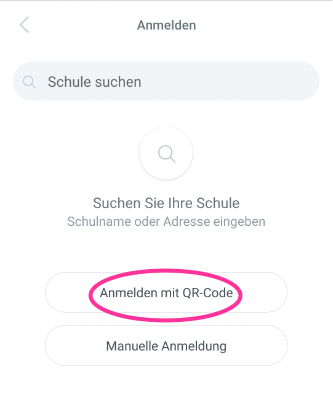
Untis Mobile App installieren (s.o.) und starten.

<div drawio-diagram="48"><img src="https://ghg.berlin/doc/uploads/images/drawio/2023-11/drawing-3-1700911499.png" alt=""/></div>

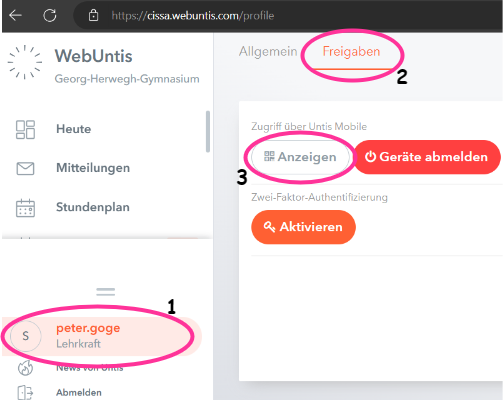
Auf dem Computer oder einem anderen zweiten Gerät WebUntis im Browser öffnen -&gt; {{@53#bkmrk-https%3A%2F%2Fcissa.webunt}}  
... und mit den IServ-Zugangsdaten anmelden.
<div drawio-diagram="47"><img src="https://ghg.berlin/doc/uploads/images/drawio/2023-11/drawing-3-1700907385.png" alt=""/></div>

</details>